
Where to place the live chat window?

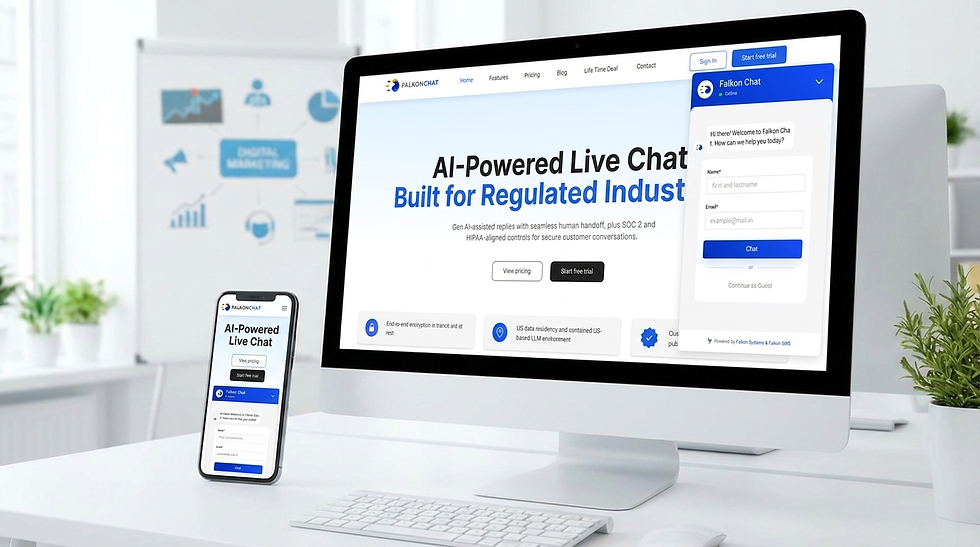
Live chat is one of the customer support channels that most of the businesses have adopted. It is a tool that helps you connect with your customers in real time. This solves customer queries or provides information about your products or services.
The code of live chat is embedded in the website code, and as per your requirement, you can select or design the appearance of your live chat icon. This software is integrated into your company’s website and social media platforms.
However, the question here is where should you place it to attract and engage maximum customers?
In this blog, we will understand the following things in detail:
Why you need a live chat widget on your website
A live chat window on your website is used to benefit both businesses and customers. Here are some key reasons why having a live chat feature is crucial for website engagement and customer satisfaction:
Real-Time Support: Live chat provides instant support to website visitors who have questions or need assistance.
Enhanced Customer Experience: Live chat offers a personalized and interactive customer experience. Users can receive tailored assistance, guidance, and recommendations from a live chat agent, leading to higher satisfaction.
Increased Sales and Conversions: Live chat can help boost sales and conversion rates by facilitating communication during purchasing.
Improved Communication: Live chat allows instant feedback, clarifications, and problem-solving, fostering better relationships and trust between the parties.
Cost-Effective Support: Live chat allows agents to handle multiple chats simultaneously, reducing business wait times and operational costs.
Analytics and Insights: Businesses can analyze chat transcripts, customer feedback, and chat metrics to optimize their service and marketing strategies.
Competitive Advantage: In today's competitive market, providing a convenient and accessible communication channel can attract more customers and improve brand reputation.
Lead Generation: By proactively engaging website visitors, businesses can capture leads, gather contact information, and nurture relationships with potential customers.
With so many benefits, having a live chat window on your website can be a competitive advantage for your business.
The Power of Placement of Live Chat: Why Location Matters?
The placement of your live chat function can significantly impact its effectiveness. Here's why location matters:
Convenience is King: A well-placed chat button makes it easy for customers to reach out to your customer service representative without hunting through menus or contact pages.
Frictionless Support: Imagine browsing a product page and having a question pop into your head. An ideally placed chat button allows you to instantly connect with a rep, keeping you engaged and on the path to purchase.
Guiding Customers: Strategic placement can anticipate customer needs. For instance, placing a chat on a complex product page proactively offers assistance before confusion arises.
Prime Real Estate: Not all locations are created equal. Standard best practices include the lower right corner, mirroring how users read web pages.
Mobile Matters: Remember mobile users! Ensure your chat window is optimized for smaller screens and easy access with thumbs. This part is later covered in detail.
By choosing the correct location for live chat placement, you can unlock its true potential: boosting customer satisfaction, increasing conversions, and streamlining your support efforts.
Best Practices for Live Chat Button Placement
Here are some best practices for placing live chat links on your website:
Visible Location: Position the chat button where it's easily visible to users. Please place it in a prominent location, such as the bottom right corner of the screen or a fixed position that scrolls with the page. Avoid hiding the chat button or places where users might overlook it.
Relevant Pages: Identify critical pages on your website where users may need assistance, such as product pages, pricing information, or checkout pages. Place the live chat link strategically on these pages to offer immediate support and guidance.
A/B Testing: Experiment with different chat button placements to determine the most effective location for your website. Conduct A/B tests to evaluate user engagement and conversion rates based on the positioning of the live chat link. Optimize the placement for optimal results. Use tools like heatmaps to track where users click and interact, helping identify the most effective chat button placement.
Feedback and Analytics: Monitor user behavior and feedback to assess the effectiveness of your live chat button placement. Analyse chat volume, response times, and customer
User Control: Allow the User to close or minimize the live chat window if they find it distracting.
Where can you place the chat button for the people using the mobile for support?
There are a few critical spots for placing a chat button on mobile devices, keeping in mind the limitations of screen size and user comfort:
Bottom corners: This popular choice mimics desktop placement and aligns with how users tend to hold phones (thumb reaching towards the bottom).
Sliding tab: A subtle tab that slides out from the side of the screen can offer easy access without cluttering the main content.
Customizable button: Some live chat services allow you to create a button specifically designed for mobile. This could be a smaller icon or a textless button that relies solely on a recognizable image.
Header or footer: While less common due to limited space, placing the button in the header or footer can provide constant visibility. However, it might be less accessible depending on the content length.
Bonus tips for mobile chat buttons:
Prioritize icon over text: Text can be complex to read on small screens. Opt for a clear and universally understood chat icon (speech bubble, envelope, etc.)
Ensure proper sizing: The button should be big enough to be easily tapped without accidental clicks on nearby elements.
Consider A/B testing: Try different placements and see which gets the most engagement from your mobile users.
These suggestions can create a mobile chat experience that's both convenient and user-friendly.
Integrating Chat Buttons with Other Touchpoints
Consider adding a chat button or CTA option to other communication channels for a comprehensive customer service strategy. Integrating chat buttons with these channels elevates customer experience and presents a seamless communication model.
Here is how this integration can be effectively implemented:
Email: This feature helps customers to start a live chat directly from the email.
Social media: This helps connect with customers, catering to their expectations for real-time engagement on these platforms.
What things should you consider when designing a live chat window?
Designing an engaging live chat window involves a combination of aesthetics, functionality, and user experience. Here are some essential secrets to consider when creating a chat window that captivates your audience:
Visual Appeal: The chat window design should align with your branding, featuring colors, fonts, and images that reflect your brand identity. A visually appealing chat interface can capture users' attention and make the conversation more enjoyable.
Clear Call-to-Action: Ensure the live chat button is prominently displayed on your website. Use compelling copy to encourage visitors to start a chat, such as "Chat with Us" or "Need Help? Chat Now." A clear call-to-action can prompt users to engage with your chat service.
User-Friendly Interface: Keep the chat window design simple and intuitive. Include essential features like message previews, typing indicators, and attachment options to enhance the user experience. A clutter-free interface makes it easier for customers to navigate the chat conversation.
Personalization: Use customer data to personalize the chat experience. Implement features like chatbots that can provide tailored responses based on user behavior and preferences. Personalized interactions can lead to higher customer satisfaction and engagement.
Mobile Responsiveness: Ensure your live chat window is optimized for mobile devices. Responsive design allows users to chat seamlessly across different screen sizes, enhancing accessibility and user satisfaction.
Set Up Your Chat Window Today with Falkon Chat
It's time to leverage a chat window for your brand’s advantage with Falkon Chat.
With Falkon Chat, you’ll find a direct way to engage with consumers. Target potential customers, increase sales, provide proactive support, and enhance your customer journey with interactive chat.
Adding a chat window to your website is easy and will let you captivate customers at all sales funnel stages.
Conclusion
In conclusion, placing a live chat button strategically on your website is essential to maximize customer engagement and satisfaction. Live chat provides real-time support, enhances user experience, and can significantly boost sales and conversions. Effective placement such as the bottom right corner, contextual spots, or optimized positions for mobile users ensures easy accessibility and usability. Incorporating A/B testing, heatmaps, and user feedback helps refine the chat button's location, making it more effective. By integrating chat buttons across various touchpoints and designing an appealing, user-friendly interface, businesses can leverage live chat to improve customer relations and gain a competitive edge.
Boost Customer Engagement with Falkon Chat
Provide instant support, improve customer experience, and increase conversions with a smart live chat solution designed for your business.


Comments